

SQL, often pronounced as “sequel,” is a domain-specific language designed for managing and manipulating relational databases. Its syntax is both intuitive and powerful, allowing users to interact with databases through a set of standardized commands.
SQL is closely associated with relational database management systems (RDBMS), such as MySQL, PostgreSQL, Oracle, and Microsoft SQL Server. These databases organize data into tables, which consist of rows and columns. SQL queries enable users to retrieve and manipulate data in these tables seamlessly.
SQL is omnipresent in today’s technology landscape. From powering dynamic websites to driving business intelligence and analytics, SQL plays a crucial role. Understanding SQL is essential for developers, data analysts, and database administrators, as it forms the backbone of efficient data manipulation and retrieval.
Installation

sudo apt-get install mysql-server
This will instal Mysql.
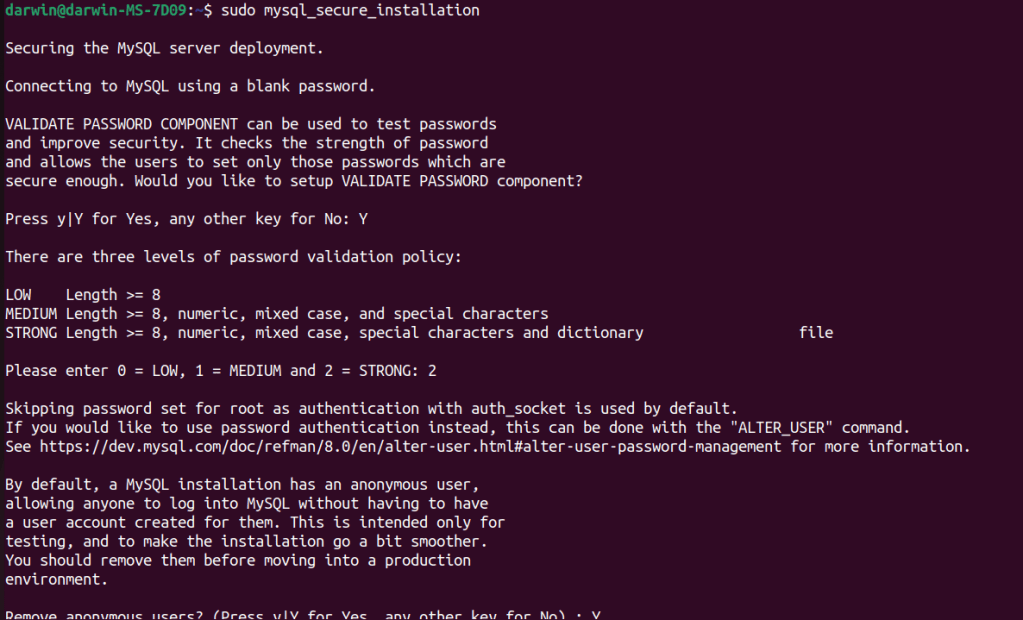
sudo mysql_secure_installation
This will set up secure installation. Makes mysql secure from unauthorized access. My set up was done so i have to put in my normal log in password. You can make it so you set up another user and password, but we are not covering this here.

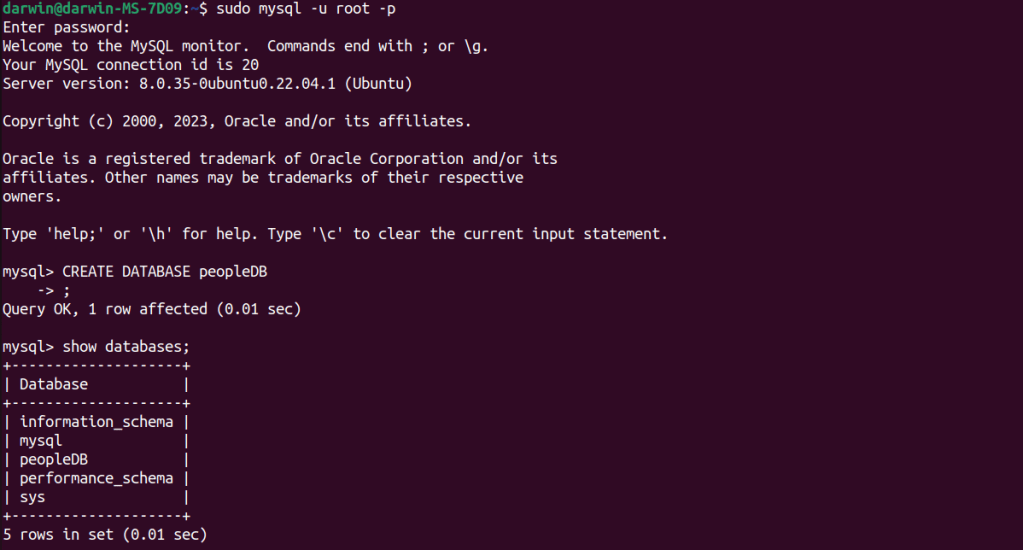
sudo mysql -u root -p – Then enter your password.
Then we type CREATE DATABASE peopleDB; – This will create a database you ca call it anything, here i have named mine peopleDB. We can view the database by typing show databases. We the type the command USE peopleDB to use that database.

We then type: CREATE TABLE people (ID INT AUTO_INCREMENT, FirstName VARCHAR(100), LastName VARCHAR(100), Address TEXT, Age INT, DOB DATE, PRIMARY KEY (ID) ); Inside the parentheses, each line represents a column in the table.
ID INT AUTO_INCREMENT: This line defines the first column named ID. It is of the data type INT (integer) and has the attribute AUTO_INCREMENT. This means that the database will automatically assign a unique, incrementing value to this column for each new row added to the table.
FirstName VARCHAR(100): This line defines column named FirstName. It is of the data type VARCHAR(100) which means it can store variable-length character strings with a maximum length of 100 characters. LastName VARCHAR(100): Similar to FirstName, this column is also a variable-length character string with a maximum length of 100 characters.
Convictions TEXT: This line defines the third column . It is of the data type TEXT, suitable for storing large amounts of text data.
Address TEXT: This line defines the fourth column named Address. It is of the data type TEXT, suitable for storing large amounts of text data.
Age INT: This line defines the fifth column named Age. It is of the data type INT (integer), representing the age of a person.
DOB DATE: The six column is named DOB and is of the data type DATE. It is intended to store date values, specifically the date of birth.
PRIMARY KEY (ID): This line designates the ID column as the primary key for the table. The primary key uniquely identifies each row in the table, and the AUTO_INCREMENT attribute ensures that each ID is unique and automatically increments with each new record.
After this we then type: INSERT INTO people (FirstName, LastName, Convictions, Address, Age, DOB) VALUES (‘Dave’, ‘Jones’, ‘Armed Robbery on 1/02/1993, Public order offence 3/05/1994′, ’58 Bournewood Avenue, London’, 38, ‘1963-08-16’);
INSERT INTO is the SQL statement used to add records to a table.
In the parentheses after INSERT INTO people, column names are specified in the same order as they were defined when creating the table. FirstName, LastName, Convictions, Address, Age, DOB are the column names.
The VALUES keyword is used to specify the actual data to be inserted into the table. The values are enclosed in parentheses and separated by commas.
Here i will use some more examples for more sql commands and uses.


Here we have created a database like before and created a table.

Here we have created a second table to link the people table. In this table there are a couple of difference.
FOREIGN KEY (PersonID) REFERENCES People(ID): This line establishes a foreign key relationship between the PersonID column in the Convictions table and the ID column in the People table. It ensures referential integrity by linking the two tables based on the ID values.
To view the tables we type: SELECT * FROM Convictions;

The database above is very close to the table before apart from the foreign key, i added this to briefly show you can connect one database to others that show different data.
Our journey through the intricacies of Structured Query Language (SQL) has unveiled a powerful tool that serves as the backbone of modern data management. From creating tables and defining relationships to inserting and querying data, SQL empowers developers, database administrators, and data analysts to interact seamlessly with relational databases.
We explored the fundamental concepts of SQL, delving into the syntax and usage of key commands. The creation of the ‘People’ table showcased how SQL can be employed to design organized and efficient data structures, ensuring data integrity through constraints such as primary and foreign keys.
Beyond the basics, our exploration extended to real-world scenarios. The insertion of a record into the ‘People’ table illustrated how SQL facilitates the seamless addition of data, capturing information about individuals, their convictions, and other pertinent details.
We continued with the creation of the ‘Convictions’ table, demonstrating the versatility of SQL in establishing relationships between tables. The use of foreign keys solidifies the relational aspect of databases, contributing to the maintenance of data integrity and coherence across tables.
SQL proves its flexibility in handling various data types, from small bits of information to large text data. The choice of appropriate data types, such as VARCHAR, TEXT, or even specialized types like CLOB, ensures efficient storage and retrieval of diverse data sets.
As we reflect on the power and versatility of SQL, it becomes evident that this language is not just a tool; it’s a cornerstone for anyone involved in data management. Whether you’re a developer shaping the architecture of a database, an analyst extracting insights, or an administrator ensuring data accuracy, SQL’s universal presence in the realm of data is undeniable.
In a world where data is king, SQL stands tall as the royal language that facilitates the smooth exchange of information. As we navigate the ever-expanding landscape of technology, the knowledge and mastery of SQL remain valuable assets, unlocking the potential to harness, manipulate, and derive meaningful insights from the vast sea of data. So, as you embark on your own SQL journey, remember that this language is not just a means to an end; it’s a key that opens doors to a world of possibilities in the realm of data.




 StealthCyberOps
Leave a comment