
Hey, do you know what an IP address is? If not, don’t worry, I’m here to explain it to you in a simple way. An IP address is a unique identifier that every device connected to the internet has. It stands for Internet Protocol address, and it’s like a phone number or a postal address for your computer, smartphone, tablet, or any other gadget that can go online.
Why do we need IP addresses? Well, imagine you want to send a message to your friend who lives in another city. You need to know their address, right? Otherwise, how would you know where to mail the letter? The same thing happens on the internet. When you want to visit a website, send an email, or watch a video, you need to know the IP address of the server that hosts that content. Otherwise, how would your device know where to send the request?
But how do you find out the IP address of a website or a server? You don’t have to memorize them or look them up in a directory. That would be very tedious and impractical. Instead, you use something called a domain name, which is a human-friendly name that corresponds to an IP address. For example, when you type http://www.google.com in your browser, your device asks a special server called a Domain Name System (DNS) server to translate that name into an IP address. The DNS server responds with something like 142.250.181.238, which is the IP address of Google’s main website. Then, your device can send the request to that address and get the content you want.
So far so good, right? But there’s more to IP addresses than just numbers. There are different types of IP addresses, such as IPv4 and IPv6, which have different formats and capacities. There are also different classes of IP addresses, such as public and private, which have different purposes and scopes. And there are different ways of assigning IP addresses, such as static and dynamic, which have different advantages and disadvantages.
IPV4 Vs IPV6
Let’s talk about IPv4 and IPv6 addresses. IPv4 is the older version of IP, which was developed in the early 1980s. It uses 32-bit addresses, which means there are four sets of numbers separated by periods, like this: 64.70.220.50. Each number can range from 0 to 255, so there are about 4.3 billion possible IPv4 addresses.
IPv6 is the newer version of IP, which was introduced in the mid 1990s to address the shortage of IPv4 addresses. It uses 128-bit addresses, which means there are eight groups of four hexadecimal numbers separated by colons, like this: 2001:0db8:85a3:0000:0000:8a2e:0370:7334. Hexadecimal numbers can include digits from 0 to 9 and letters from A to F, so there are about 340 undecillion possible IPv6 addresses.
The main difference between IPv4 and IPv6 is the size and format of the addresses. IPv6 has a much larger address space than IPv4, which means it can support more devices and networks on the internet. IPv6 also has some other advantages over IPv4, such as improved security, efficiency and performance.
IP addresses: Public and Private
There are two types of IP addresses: public and private. Public IP addresses are visible to the whole internet, while private IP addresses are only used within a local network, such as your home or office. Let’s see how they differ and why they are both important.
Public IP Addresses:
A public IP address is an outward-facing IP address that is assigned to your router by your internet service provider (ISP). It acts as a gateway between your local network and the internet, allowing you to access websites, send emails, stream videos, and more.
A public IP address is unique on the internet, meaning no two devices can have the same public IP address at the same time. This ensures that the data you send and receive reaches the correct destination without any confusion or interference.
Public IP addresses belong to one of the following ranges:
- 1.0.0.0-9.255.255.255
- 11.0.0.0-100.63.255.255
- 100.128.0.0-126.255.255.255
- 128.0.0.0-169.253.255.255
- 169.255.0.0-172.15.255.255
- 172.32.0.0-191.255.255.255
- 192.0.1.0/24
- 192.0.3.0-192.88.98.255
- 192.88.100.0-192.167.255.255
- 192.169.0.0-198.17.255.255
- 198.20.0.-223.255.255.255
You can find out your public IP address by searching “what is my IP address” on Google or using a website like https://www.whatismyip.com/.
Public IP addresses have some advantages and disadvantages:
Advantages:
- They allow you to access the internet and use online services.
- They enable you to set up a server (such as VPN, FTP, etc.) and provide remote access to your device.
- They make your device identifiable and traceable on the internet.
Disadvantages:
- They expose your device to potential cyberattacks and hacking attempts.
- They reveal your approximate location and ISP information to anyone who looks it up.
- They may change periodically depending on your ISP’s policy.
Private IP Addresses:
A private IP address is an inward-facing IP address that is assigned to your device by your router or network administrator within a local network, such as your home or office.
A private IP address is not visible to the internet, meaning it cannot be used to access online services or communicate with other devices outside your local network.
A private IP address is only unique within your local network, meaning multiple devices on different networks can have the same private IP address without any conflict.
Private IP addresses belong to one of the following ranges:
- 10.-55.-55.-55
- 172.-16.-31.-55
- 192.-168.-55.-55
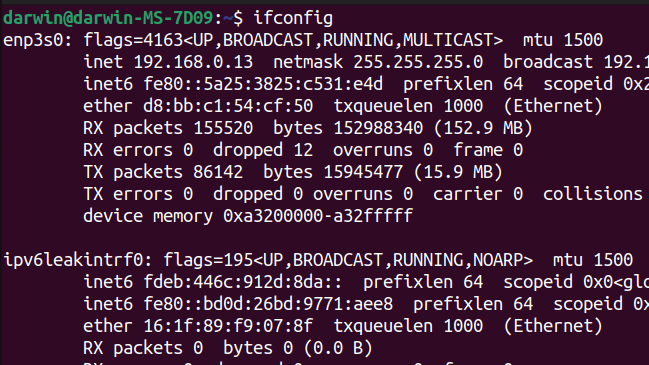
You can find out your private IP address by checking your device’s network settings or using a command line tool like ipconfig (Windows) or ifconfig (Linux).
Private IP addresses have some advantages and disadvantages:
Advantages:
- They allow you to communicate with other devices on your local network, such as printers, scanners, smart TVs, etc.
- They protect your device from unwanted traffic and attacks from the internet.
- They are free and unlimited, meaning you can assign as many as you want within your local network.
Disadvantages:
- They cannot be used to access the internet or use online services without a public IP address.
- They may cause confusion or errors if two devices on the same networks have the same private IP address.
- They may change periodically depending on your router’s settings or DHCP server.
IP Classes:
IP classes are a way of categorizing IP addresses based on the number of bits used for the network and host parts. IP addresses are 32-bit numbers that consist of four octets (8 bits each) separated by dots. For example, 192.168.1.100 is an IP address.
There are five IP classes: A, B, C, D and E. Each class has a different range of values for the first octet, which determines how many networks and hosts can be in that class. Here is a table that summarizes the IP classes and their ranges:
| Class | First octet range | Number of networks | Number of hosts per network |
|---|---|---|---|
| A | 1 – 127 | 126 | 16,777,214 |
| B | 128 – 191 | 16,382 | 65,534 |
| C | 192 – 223 | 2,097,150 | 254 |
| D | 224 – 239 | N/A | N/A |
| E | 240 – 255 | N/A | N/A |
Class D and E are reserved for special purposes, such as multicast and experimental use. We will focus on class A, B and C, which are used for unicast communication.
Now, not all IP addresses in these classes are available for public use on the internet. Some IP addresses are designated as private, which means they can only be used within a local network, such as your home or office network. Private IP addresses are not visible to the public and cannot be routed on the public internet.
Private IP address ranges are divided into three ranges:
- Class A – 10.0.0.0 to 10.255.255.255
- Class B – 172.16.0.0 to 172.31.255.255
- Class C – 192.168.0.0 to 192.168.255.255
The advantage of using private IP addresses is that they allow you to create your own network without worrying about conflicts with other networks on the internet. You can have multiple devices with the same private IP address as long as they are on different networks.
However, if you want to communicate with devices on the internet, you need to use a public IP address, which is an IP address that is unique and globally routable on the internet.
Public IP address ranges are the ones that are not reserved for private use or special use.
For example:
- Class A – 1.0.0.0 to 9.255.255.255 and 11.0.0.0 to 126.255.255.255
- Class B – 128.0.0.0 to 172.15.255.255 and 172.32.0.0 to 191.255.255.255
- Class C – 192.0.0 to 192.167.255.255 and *192.169.0.0* to *223.255.255.255*
Note that there is also a special IP address range that is used for loopback testing: *127.0.0.1* to *127.255.255.255***.
This range is used to test the connectivity of your own device without sending any packets out of your network.
Each class has a different number of networks and hosts that can be in that class. Some IP addresses are private and can only be used within a local network. Some IP addresses are public and can be used on the internet. Some IP addresses are special and have specific functions.
I hope you enjoyed this blog post and learned something new about IP classes. If you have any questions or comments, feel free to leave them below.




 StealthCyberOps
Leave a comment