

What is OpenVPN?
OpenVPN is a highly popular and versatile open-source software that enables secure point-to-point or site-to-site connections using virtual private network (VPN) techniques. Since its introduction in 2001, OpenVPN has become one of the most trusted solutions for establishing encrypted communications over the internet, providing users with robust security and privacy.
How OpenVPN Works
OpenVPN works by creating a secure tunnel between the user’s device and a remote server. All data transmitted through this tunnel is encrypted, ensuring that any intercepted information is unreadable to unauthorized parties. The encryption protocols typically used by OpenVPN include OpenSSL, which supports a wide range of cryptographic algorithms, providing both confidentiality and integrity to the data.
OpenVPN can operate in two modes:
Routing (Layer 3 VPN): In this mode, OpenVPN functions as a router, creating an encrypted path between the user and the server. This is ideal for site-to-site VPNs, where entire networks are connected through a secure link.
Bridging (Layer 2 VPN): This mode allows OpenVPN to act as a bridge, simulating a local area network (LAN) over the internet. It’s commonly used when a virtual network adapter needs to be shared across different physical locations.
Key Features of OpenVPN
Cross-Platform Compatibility: OpenVPN is available on multiple platforms, including Windows, macOS, Linux, Android, and iOS, making it accessible for a wide range of users.
Customizable Security: OpenVPN allows users to choose from a variety of encryption standards, such as AES-256, and supports various authentication methods, including pre-shared keys, username/password combinations, and certificates.
Flexible Configurations: It can be configured to suit different network topologies and requirements, whether for individual users needing secure access or enterprises needing to interconnect multiple networks securely.
Strong Community and Support: As an open-source project, OpenVPN benefits from a large, active community of developers and users. This contributes to regular updates, patches, and the availability of extensive documentation.
Enterprise Solutions: In addition to the free open-source version, OpenVPN Inc. offers a commercial solution, OpenVPN Access Server, which provides additional features such as a web-based interface, simplified configuration, and enhanced management tools.
Use Cases of OpenVPN
Remote Access: Companies can use OpenVPN to allow employees to securely access internal networks from remote locations. This is particularly important for businesses that support remote work or have employees traveling frequently.
Site-to-Site VPN: OpenVPN can connect entire networks across different geographic locations, ensuring secure communication between different branches of an organization.
Privacy Protection: Individuals can use OpenVPN to protect their internet traffic from eavesdropping, especially on unsecured networks like public Wi-Fi. This is essential for safeguarding personal data, such as passwords and credit card information.
Bypassing Geographical Restrictions: OpenVPN is also widely used to bypass geographical restrictions imposed by certain services or governments, allowing users to access content that might otherwise be blocked in their region.
OpenVPN is renowned for its security, but the actual performance depends on factors like the server’s location, the level of encryption used, and the network’s overall speed. While higher encryption levels offer better security, they can also reduce connection speeds due to the increased computational load.
OpenVPN on Ubuntu
sudo apt update && sudo apt install openvpn -y

Download vpn files from vpnbook website. These will be under following servers.

Extract the downloads. Then cd in to the vpn directory.
Type: sudo openvpn vpnbook-uk68-udp53.ovpn. You will also need the usename and password from the bottom of the page on vpnbook. The password will change over time.
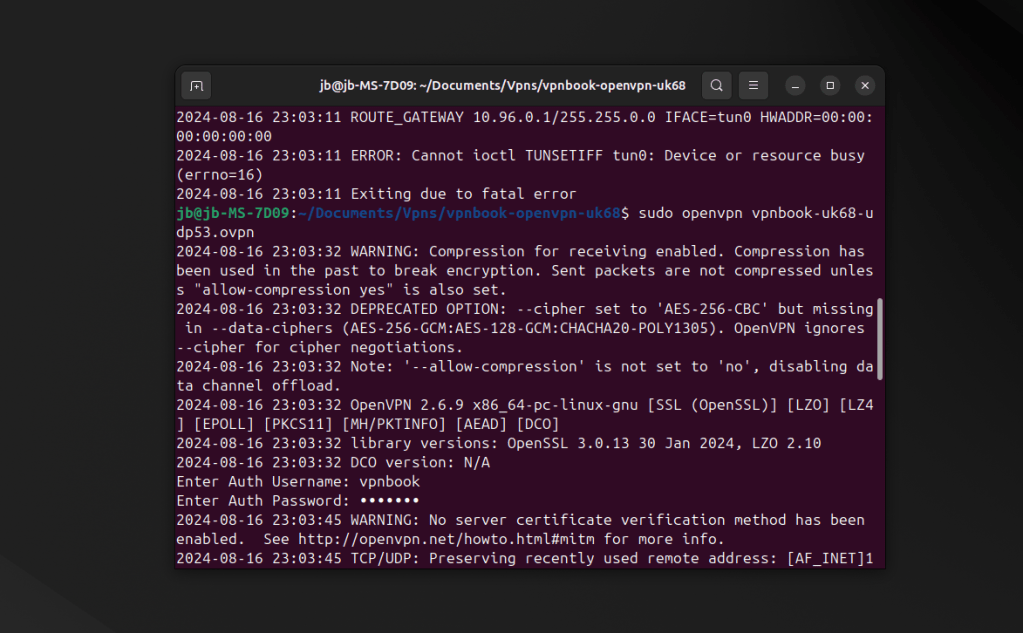

You should see Initialization Sequence Completed. Go to dns leack test website to check it is working.
You can add more protection by using nextdns.io. Sign up and you will get a link like the one i show below. In firefox under privacy and security go to enable dns over https and select max protection, under custom enter your nextdns eg. https://dns.nextdns.io/6855fgh.
OpenVPN stands out as a reliable, flexible, and secure solution for anyone looking to protect their online activities or establish private networks across the internet. Its open-source nature, combined with strong community support, makes it a top choice for both individuals and businesses. Whether you need a simple VPN for personal use or a complex, multi-site network connection, OpenVPN provides the tools necessary to ensure your data remains private and secure.




 StealthCyberOps
Leave a comment