

Before we get in to john the ripper Lets start of with some info on hashes. Hashes are unique values generated by applying a hash function to data (like text, files, or other data types). They serve as digital fingerprints, helping to verify data integrity and enable quick data lookup and storage.
How They Work: A hash function converts input data into a fixed-length value (called a hash or hash value) regardless of the input size. Even minor changes in input data lead to vastly different hash values. Common hash functions include MD5, SHA-1, and SHA-256.
Integrity Verification: Hashes are widely used to ensure data integrity. For instance, when you download a file, the provider may share its hash value, which you can compare with the file’s hash after download. If the values match, the file hasn’t been altered.
Data Lookup: Hashes make data lookup more efficient, especially in data structures like hash tables, where keys are converted to hash values for faster retrieval.
Security (Cryptography): In cryptography, hashes secure sensitive data, such as passwords. A password is often stored as a hash rather than plain text. When you log in, the system hashes your input and compares it with the stored hash.
Blockchain and Digital Signatures: Hashes help verify transaction integrity in blockchain and digital signatures by ensuring that data (such as a transaction) hasn’t been altered.
Hashes are considered secure when they possess certain properties that make them resistant to manipulation, predictable patterns, and collisions. Here are the key attributes that contribute to hash security:
Deterministic: A secure hash function will always produce the same hash for the same input. This predictability allows for consistent verification—any change in the input will yield a completely different hash.
Non-Reversible (One-Way Function): A good hash function is one-way, meaning it’s practically impossible to reverse-engineer the original input from the hash value. This is critical for security, especially in cryptography (e.g., passwords). Without this property, hashes could be reverse-engineered, exposing sensitive data.
Collision Resistant: In a secure hash function, it should be practically impossible to find two different inputs that produce the same hash (a collision). Collisions weaken hash security, as finding such pairs can undermine data integrity. Collision resistance is essential for secure storage, digital signatures, and data integrity checks.
Avalanche Effect: A secure hash function has a strong “avalanche effect,” where a small change in the input—like altering a single character—results in a dramatically different hash. This effect makes it challenging for an attacker to infer information about the input or to make predictable modifications that produce a desired hash.
Speed Efficiency: A secure hash function is designed to be fast to compute while still being computationally intensive enough to prevent brute-force attacks. Modern hash algorithms balance efficiency with resistance to attacks.
Resistance to Pre-Image and Second Pre-Image Attacks:
Pre-image resistance means that given a hash value, it should be computationally infeasible to find the original input that produced it.
Second pre-image resistance means that given an input and its hash, it should be infeasible to find a different input that produces the same hash.
Second pre-image resistance means that given an input and its hash, it should be infeasible to find a different input that produces the same hash.
a secure hash function provides consistency, irreversibility, collision resistance, and efficiency. These properties make hashes a robust tool for protecting and verifying data in many digital applications. Online hash identifiers are available to tell you what the hash you are working with.
What is John the Ripper?
John the Ripper was initially developed to detect weak Unix passwords, but over time, it has expanded to support a wide range of operating systems and hashing algorithms. This tool can now handle various encrypted password formats, such as Unix/Linux, Windows, and even database-specific hashes. John can also tackle different types of encryption, including DES, MD5, SHA-512, bcrypt, and even the newer Yescrypt format.
Key Features of John the Ripper
- Multi-platform Compatibility: John is available for Linux, Windows, and macOS, making it accessible across different environments.
- Broad Hash Support: John can handle password hashes from a wide variety of sources, including traditional /etc/shadow hashes from Linux, NTLM hashes from Windows, and even password hashes from applications and databases.
- Extensibility and Customization: Users can extend John’s capabilities by adding custom cracking rules and modules, especially in the John the Ripper Jumbo edition, which adds many extra features and formats.
Powerful Cracking Modes: John supports multiple password-cracking techniques, including:
- Dictionary Attack: Runs through a list of potential passwords (wordlist) to find matches.
- Brute-force Attack: Tries every possible combination of characters, often in a controlled sequence to maximize efficiency.
- Hybrid Attack: Combines wordlists with character variations, such as appending numbers or symbols to words.
- Mask Attack: Targets specific patterns, ideal for passwords with known structures, such as P@ssw0rd!.
How Does John the Ripper Work?
John the Ripper operates by reading hashed passwords from files and comparing them to potential password candidates. The tool uses several approaches to generate candidates:
- Default Mode: John will start with simple transformations and common words if no wordlist is provided. This mode can find weak passwords fairly quickly.
- Wordlist Mode: With this mode, John uses a list of known or commonly used passwords and applies transformations (known as “rules”) to them. For example, it can convert “password” to “Password1” or “password123” and check each variant.
- Incremental Mode (Brute-force): In this mode, John tries every possible character combination, making it effective for short and simple passwords but time-intensive for longer, complex passwords.
- Mask Mode: This lets users define specific patterns to reduce the cracking time by focusing on probable combinations. For example, you can specify that the password starts with a capital letter, followed by lowercase letters and numbers, and ends with a symbol.
Popular Use Cases for John the Ripper
Security Audits: Penetration testers use John the Ripper to test the strength of passwords within an organization’s network. By attempting to crack passwords, they can identify weak ones that could make the network vulnerable.
Forensics and Recovery: John is also used by digital forensics experts for password recovery, allowing them to access encrypted data on seized devices or in investigations.
Compliance Testing: Many security compliance frameworks require organizations to enforce strong passwords. John the Ripper can verify compliance by testing if an organization’s password policy is effective against cracking.
Installing John the Ripper
To install John on Linux:
sudo apt update
sudo apt install john
For the Jumbo edition, you may need to build it from source, which is documented on the John the Ripper GitHub repository. It comes installed with kali linux.
Usage:
john –format=raw-md5 –wordlist=/usr/share/wordlists/rockyou.txt hash2.txt
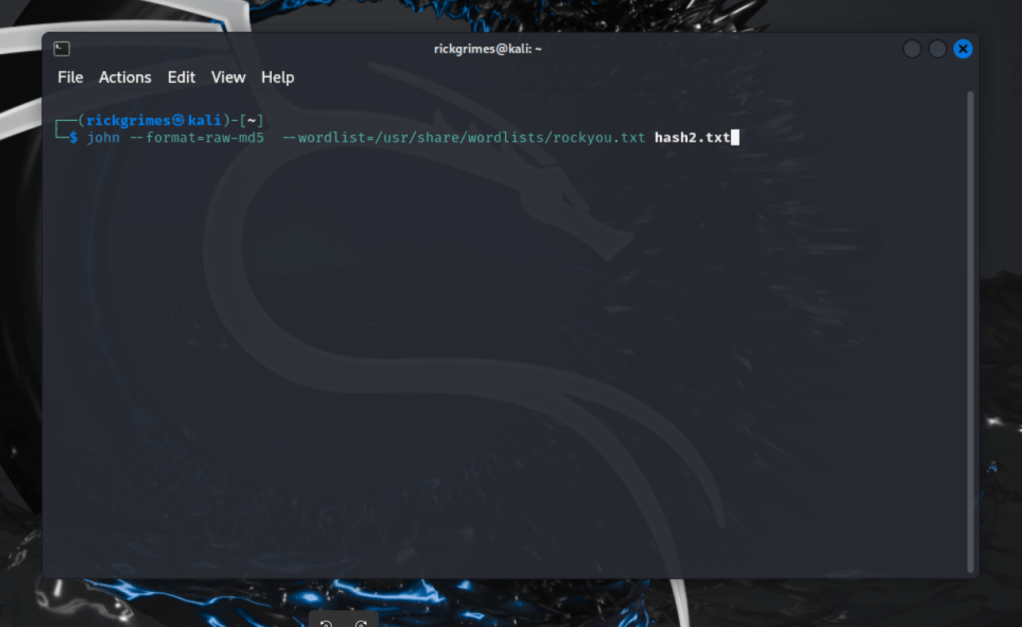

Here we are cracking an MD5 hash with wordlist. using rockyou.txt
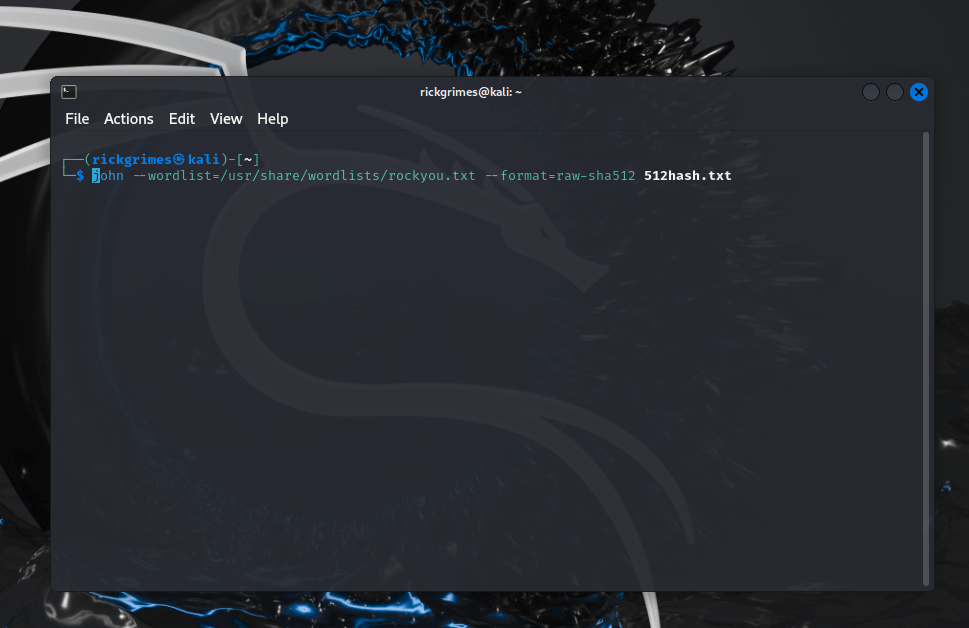
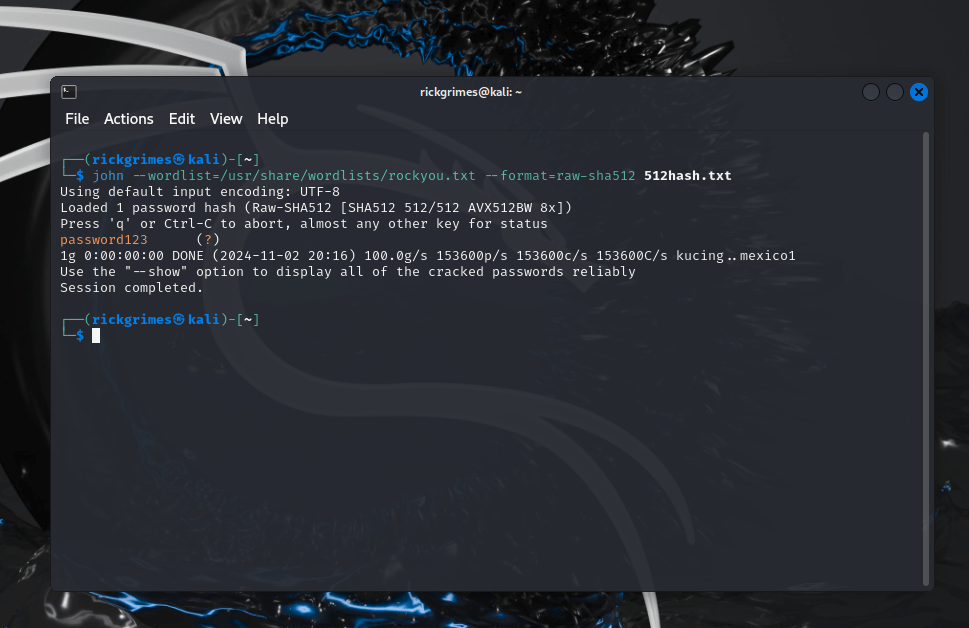
Above we have SHA-512 being cracked.
Single crack mode
Single crack” mode is recommended as the initial mode for password cracking. It leverages login names, “GECOS” (or “Full Name”) fields, and user home directory names as candidate passwords, applying a comprehensive set of mangling rules. Since this information is targeted specifically at passwords for the accounts it originates from (or for hashes with the same salt), single crack mode operates much faster than wordlist mode. This allows a larger set of word mangling rules to be applied effectively, which are always enabled in this mode. Additionally, any successfully cracked passwords are tested against all loaded hashes to check if other users share the same password.
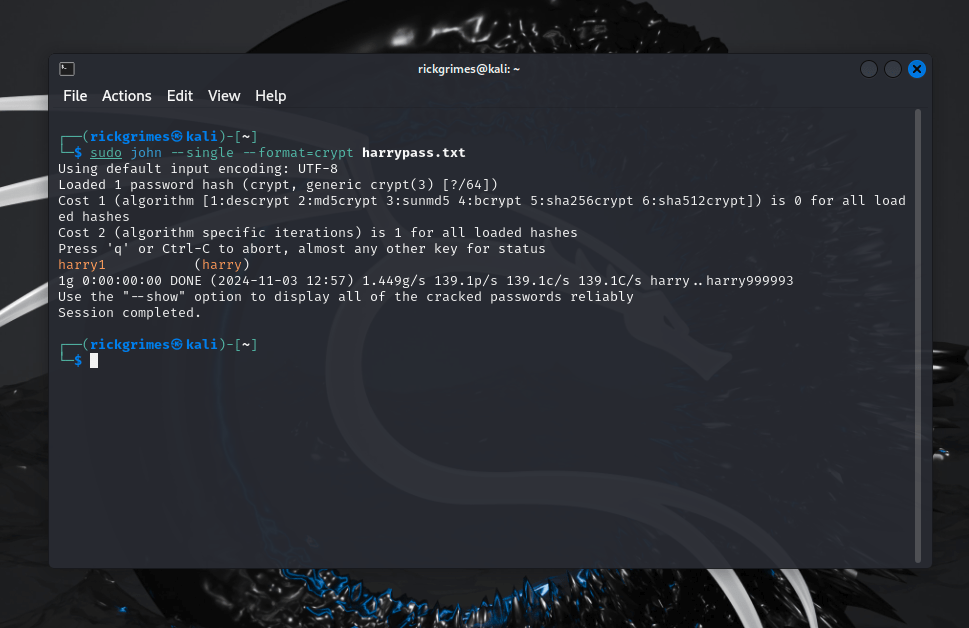
In my Kali machine i have created a user and given them a password.

sudo John –single –format=crypt harrypass.txt

Crypt is for the encryption yescrypt used in modern linux distros.
Zip2John
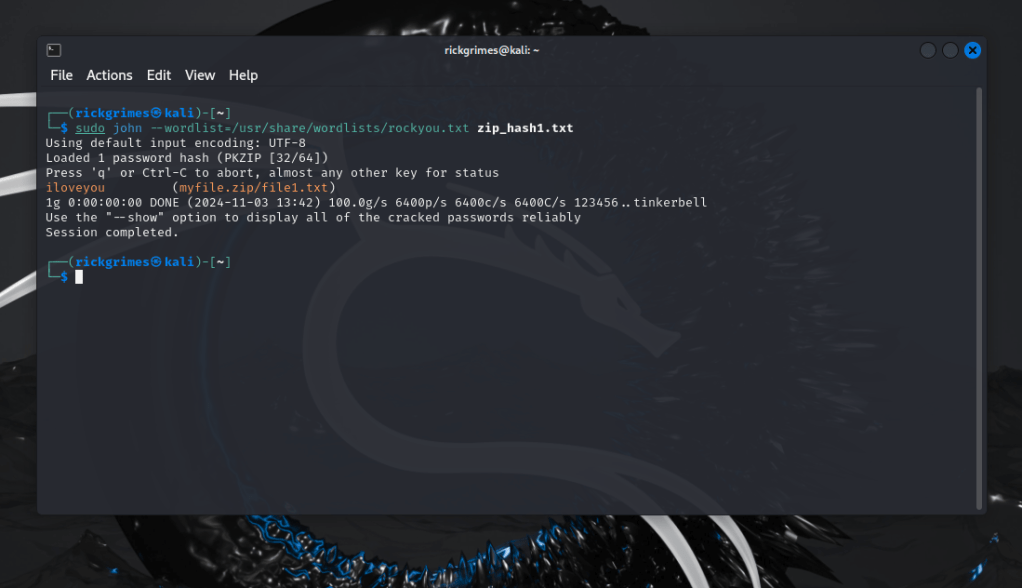
Here we are taking a password protected zip file and passing through zip2john this will pass the hash to our hash file. We will then crack it with john.

sudo john –wordlist=/usr/share/wordlists/rockyou.txt zip_hash1.txt
rar2john
This is very similar to the above, we extract the hash into a file then crack.

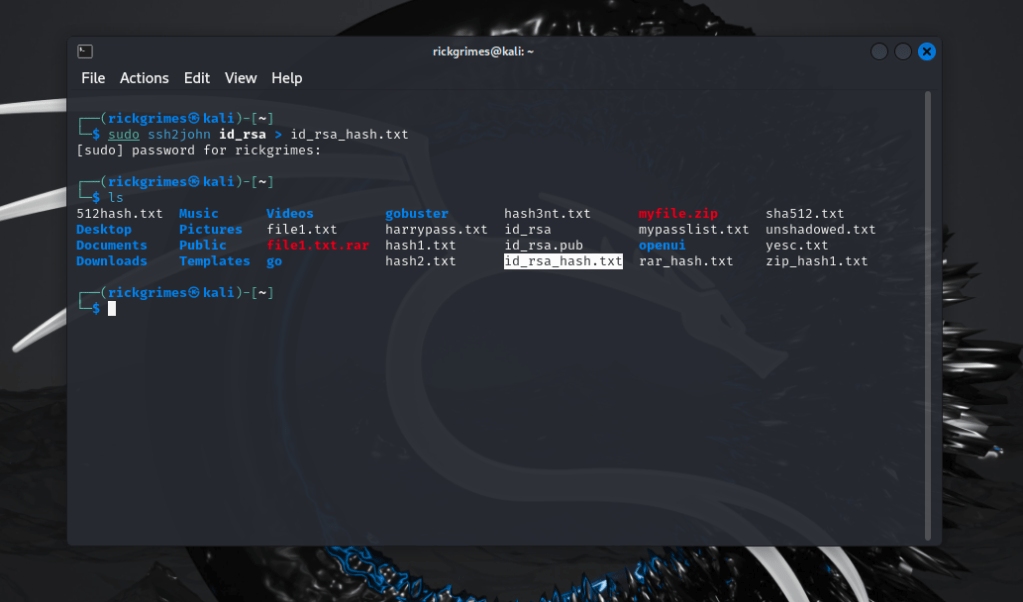
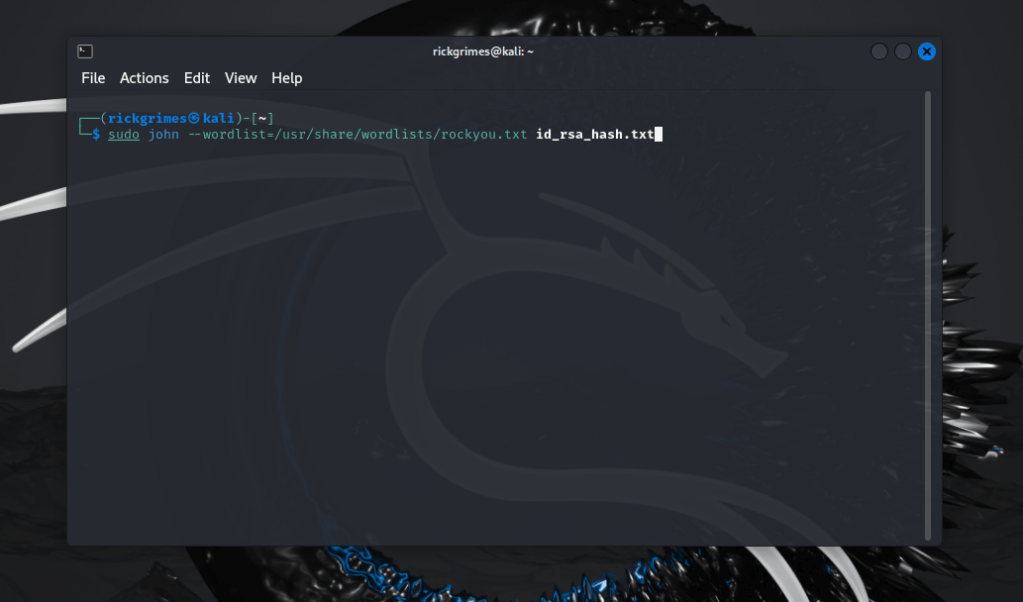
ssh2john
Again similar to above this time using ssh.

Custom Rules
In John the Ripper, custom rules allow for highly specific and flexible password-cracking strategies tailored to the target’s likely password patterns. Rules define how John should transform and generate password candidates, helping crack complex passwords by applying transformations like appending, prepending, reversing, or substituting characters. Here’s an overview of how to create and use custom rules:
Structure of Custom Rules
Rules are defined in John the Ripper’s configuration file (usually john.conf or .john/john.conf), under the [List.Rules:] section. Each line in a rule section represents a unique transformation rule. The syntax is powerful but has specific commands, each indicating a transformation.
[List.Rules:myrules]
cAz”[0-9]”
cAz”[0-9][0-9]”
cAz”[£!$]”
cAz”[0-9][£!$]”
So example of the first one here would be capital letter followed by numbers eg. passowrd1, password2 etc. 3rd one capital letter followed by symbols password!@.
unshadowed.txt
The unshadow command in Unix-based systems (such as Linux) is used to combine entries from the /etc/passwd and /etc/shadow files into a single file, often named unshadowed.txt. This combined file can then be used by password-cracking tools like John the Ripper, as it provides both usernames and hashed passwords in a compatible format.
What are /etc/passwd and /etc/shadow?
/etc/passwd: This file contains user account information, including usernames, user IDs (UIDs), and group IDs (GIDs). Passwords used to be stored here as well, but for security reasons, this practice has been phased out.
/etc/shadow: This file stores encrypted password hashes and password expiration information. Only privileged users (root) can access /etc/shadow, making it more secure than /etc/passwd.
To crack Linux password hashes, you need both the username from /etc/passwd and the encrypted password from /etc/shadow. The unshadow command accomplishes this by combining the two files into one unshadowed.txt file that includes the necessary information for John the Ripper.
Creating unshadowed.txt with the unshadow Command
Here’s how to create the unshadowed.txt file:
- Gather Both Files: Ensure you have read access to
/etc/passwdand/etc/shadow. You’ll need root privileges to access/etc/shadow. - Run the
unshadowCommand: Use theunshadowcommand to combine these files.
unshadow /etc/passwd /etc/shadow > unshadowed.txt
Then we run john to crack the password to unshadowed.txt

Incremental Mode
Incremental mode is one of John the Ripper’s most powerful and flexible password-cracking modes. It’s a brute-force approach that systematically tries all possible character combinations within specified parameters, such as character sets and length. Incremental mode is especially effective when no information about the password is known or when other methods, like dictionary attacks, have failed.
How Incremental Mode Works
In incremental mode, John the Ripper generates every possible password combination up to a certain length, trying them all against the target hash. John prioritizes likely candidates first, making the process more efficient than a simple brute-force attack. This mode uses character frequencies and patterns based on real-world passwords, helping it find likely matches sooner.
Incremental mode is best used when:
- No prior knowledge of the password is available.
- Complex passwords with random characters are suspected, where wordlists or hybrid attacks might fall short.
- Custom character sets or lengths are needed to fit specific password policies or expectations.
Configuring Incremental Mode in John the Ripper
Incremental mode is highly configurable. Here are key configuration options:
- Character Sets: Define the character set that John will use for combinations. For example, lowercase letters, uppercase letters, numbers, and symbols.
- Password Length: Specify the maximum password length to consider, as longer passwords dramatically increase cracking time.
- Custom Rules: John’s configuration file, typically
john.conf, contains preset configurations for incremental mode, such as[Incremental:All],[Incremental:Digits], and[Incremental:Alpha], which can be modified or expanded.
Running Incremental Mode
To use incremental mode, simply run:
john --incremental hashes.txt
You can specify different presets for incremental mode by adding the mode name:
john --incremental=Digits hashes.txt

Here’s what these incremental mode configurations mean:
- All: Uses the full character set, including uppercase, lowercase, digits, and symbols.
- Digits: Uses only numbers, ideal for PINs or numeric-only passwords.
- Alpha: Uses only alphabetic characters, both uppercase and lowercase.
Let’s say you have a hash file, hashes.txt, and you want to crack it using incremental mode with a maximum length of characters and minimum length:
sudo john --incremental --min-length=2 max-length=3 --format=crypt barrpass.txt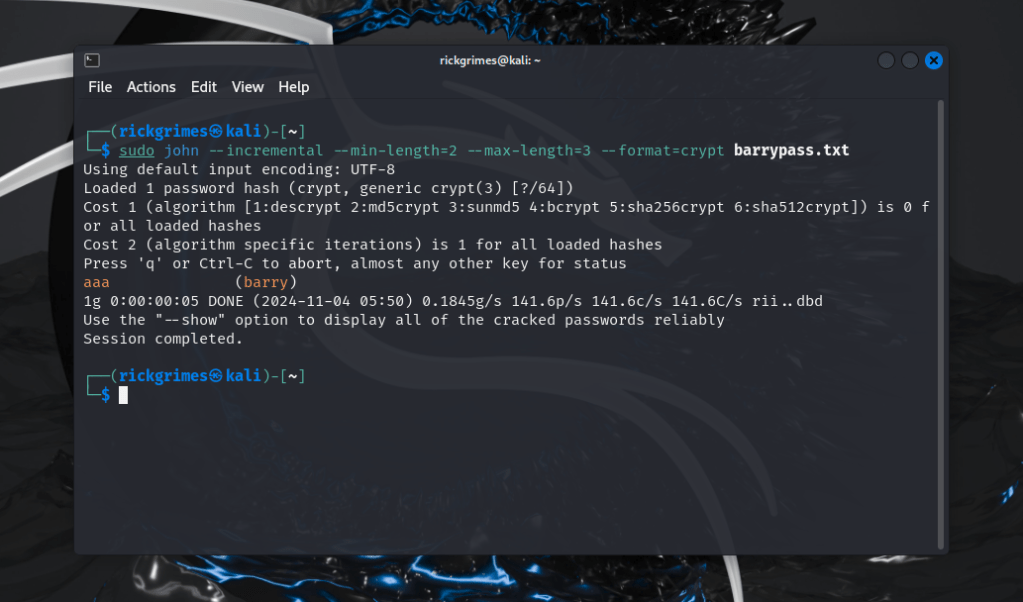
or
john --incremental=All --max-length=8 hashes.txt
Customizing Incremental Mode
You can modify or create custom incremental modes in the john.conf file:
[Incremental:MyCustomIncremental]
File = $JOHN/john.pot
MinLen = 4
MaxLen = 8
CharCount = 96
In this example:
- MinLen and MaxLen set the minimum and maximum password lengths.
- CharCount defines the character set size.
Pros and Cons of Incremental Mode
Pros:
- Very thorough, especially for short passwords.
- Useful when there is no pattern or dictionary to work from.
Cons:
- Very time-consuming and resource-intensive for long passwords.
- Not ideal for passwords longer than 8–10 characters unless restricted to small character sets.
Incremental mode is a brute-force approach with optimizations that prioritize commonly used patterns. It’s powerful but requires significant resources, especially for longer passwords or large character sets. It’s ideal when no information is available about the password, and the only option is to try every possibility.
NTHash / NTLM
NTHash (or NTLM hash) is a cryptographic hashing algorithm used by Windows to store user passwords securely, particularly in legacy systems. NTLM (NT LAN Manager) is an authentication protocol developed by Microsoft that relies on NTHash, among other components. Here’s a breakdown of NTHash, how it fits into NTLM, and why it has both strengths and weaknesses:
NTHash
Definition: The NTHash (often referred to as NTLM hash) is the result of hashing a password using an algorithm based on MD4. The algorithm converts the password into a 16-byte hash value.
Purpose: NTHash is used to securely store user passwords within Windows systems by transforming the password into a hashed format. Instead of storing the actual password, Windows stores the hash, which is checked against when the user logs in.
Process: When a user enters their password, the system hashes it using the NTHash algorithm and compares it to the stored hash. If the hashes match, the user is authenticated.
NTLM (New Technology LAN Manager) is an authentication protocol that evolved from LAN Manager (LM), an older, less secure method. NTLM uses NTHash within its authentication process but also includes other steps for verifying user identity.
Challenge-Response Authentication:
NTLM doesn’t send the password or even the hash directly. Instead, it uses a challenge-response mechanism. The server generates a random number (a challenge), and the client has to encrypt it using the hash of the user’s password. The server verifies the response to authenticate the user.
Versioning:
- NTLMv1: The first version used relatively simple cryptographic techniques and is vulnerable to several attacks.
- NTLMv2: NTLMv2 improved upon NTLMv1 by incorporating stronger encryption and hashing and is still used in some Windows environments today, although it’s considered less secure than modern alternatives (like Kerberos).
Weaknesses of NTHash / NTLM
MD4 Vulnerability: NTHash uses MD4, a hash function now considered insecure due to its vulnerability to collisions and its computational simplicity. This makes NTHash easier to crack, especially for weak passwords.
Lack of Salting: Unlike more modern hashing methods, NTLM hashes don’t use salting, which is the addition of random data to each password before hashing. Without salting, attackers can use precomputed hash tables (rainbow tables) to crack passwords efficiently.
Susceptibility to Pass-the-Hash Attacks: NTLM doesn’t require re-hashing each login attempt, which makes it susceptible to “pass-the-hash” attacks. In this type of attack, an attacker can capture a password hash and use it to authenticate without knowing the actual password, as long as they have network access.
Vulnerability to Brute Force Attacks: Because NTHash is relatively computationally lightweight, attackers can attempt many password guesses per second, especially when hashes are not locked after repeated failures.
Alternatives and Modern Usage
Due to these weaknesses, NTLM has mostly been replaced by the Kerberos protocol in modern Windows environments, though NTLM is still maintained for compatibility with older systems or applications that rely on it. Microsoft has also introduced security settings to limit NTLM usage, especially on domain-connected networks.
In short, NTHash and NTLM served their purpose well in early Windows environments but are now considered outdated and vulnerable. Modern systems use Kerberos for authentication, and NTLM is generally avoided where possible due to its limitations in handling today’s security challenges.
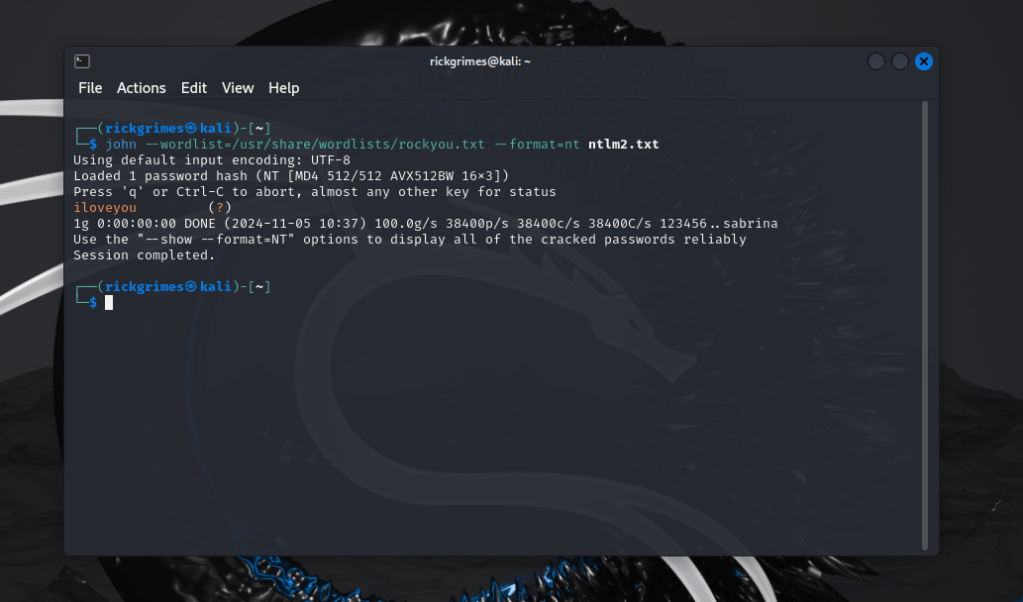
sudo john --wordlist=/usr/share/wordlists/rockyou.txt --format=nt ntlm.txtHere i show a basic ntlm crack with john the ripper.
John the Ripper’s strength lies in its versatility, speed, and depth of features, making it a critical tool in any security professional’s toolkit. Whether you’re auditing password strength, recovering lost passwords, John offers a wide range of techniques to crack or test password hashes, helping to secure systems against unauthorized access.




 StealthCyberOps
Leave a comment